Operating manual for editorial teams — SEO guidance for completing alt, description, caption and title fields in images.
Below you will find two versions: a shorter operating version and a full training version.
This manual is based on the following principles: WordPress distinguishes between Alt Text, Title, Caption and Description. ALT is used for accessibility, Title is the media name, Caption is a short explanation of the media, and Description is the description of a specific file. (WordPress.org)
WooCommerce recommends descriptive ALT text for product images and visual store elements, and product images as well as linked images should not be treated as decorative. (WooCommerce)
Google recommends descriptive file names, titles and ALT text, placing images near relevant text, and avoiding keyword stuffing. (Google for Developers)
Variant 1 — short operating manual for the team
1. Input data
Before completing image fields, the editor collects the following information:
| Data | Placeholder | Example |
|---|---|---|
| Course / product name | [course_name] | Desery na słodki stół |
| Trainer | [trainer] | Jakub Janiuk |
| School / brand | [school] | Szkoła Artystyczna Wiesław Kucia w Lublinie |
| Location | [city] | Lublin |
| What is visible in the photo | [what_is_visible] | fruit tartlets with cream |
| Image placement scenario | [scenario] | main product image, gallery, product description, short description |
2. Main rule
Do not enter the same text everywhere.
ALT, title, caption and description have different functions.
| Field | Function | How to write it |
|---|---|---|
| ALT | Accessibility + SEO context | Briefly: what is visible + page context |
| Title | Media name in WordPress / media library | A human-readable name |
| Caption | Visible text below the image, if the theme displays it | Only when it helps the user |
| Description | Longer archival / editorial description | May include course, trainer, school and context |
3. Scenario A — main WooCommerce product image
Goal
The main product image represents the product/course. Here, ALT text should connect the image more strongly with the offer.
Pattern
| Field | Pattern |
|---|---|
| ALT | [what_is_visible] in the [course_name] course in [city] |
| Title | [course_name] – [what_is_visible] |
| Caption | Usually empty or a short description of the course outcome |
| Description | Full context: what is visible + course + trainer + school |
Example
| Field | Content |
|---|---|
| ALT | Fruit tartlets with cream in the Desery na słodki stół course in Lublin |
| Title | Desery na słodki stół – fruit tartlets with cream |
| Caption | Example desserts prepared during the “Desery na słodki stół” course. |
| Description | The image shows fruit tartlets with cream, strawberry, banana and an edible flower. It is the main product image for the “Desery na słodki stół” course, led by Jakub Janiuk at Szkoła Artystyczna Wiesław Kucia w Lublinie. |
4. Scenario B — image in the WooCommerce product gallery
Goal
The gallery shows details of the product/course. Here, do not repeat identical ALT text for every image.
Pattern
| Field | Pattern |
|---|---|
| ALT | [specific frame / what is visible] from the [course_name] course |
| Title | [what_is_visible] – [course_name] |
| Caption | Optional; only if it helps the user |
| Description | Full context of the image and course |
Example
| Field | Content |
|---|---|
| ALT | Fruit tartlets with cream from the Desery na słodki stół course |
| Title | Fruit tartlets with cream – Desery na słodki stół |
| Caption | Fruit tartlets as an example of desserts for a sweet table. |
| Description | The image shows fruit tartlets with cream, fruit and an edible flower. It is used in the product gallery for the “Desery na słodki stół” course, led by Jakub Janiuk at Szkoła Artystyczna Wiesław Kucia w Lublinie. |
5. Scenario C — image inside the full product description
Goal
An image inside the product description should support a specific content segment: the training outcome, technique, program, atmosphere or trainer.
Pattern
| Field | Pattern |
|---|---|
| ALT | [what is visible] + [why it matters in the paragraph context] |
| Title | [what_is_visible] – [section topic or course] |
| Caption | Worth adding if the image has educational or sales value |
| Description | Full image description + course context |
Example
| Field | Content |
|---|---|
| ALT | Finished fruit tartlets presented as an element of a sweet table |
| Title | Fruit tartlets as an element of a sweet table |
| Caption | An example of an outcome participants can learn during the “Desery na słodki stół” course. |
| Description | The image shows finished fruit tartlets with cream, presented as an example of desserts that can be used on a modern sweet table. The image supports the description of the “Desery na słodki stół” course, led by Jakub Janiuk at Szkoła Artystyczna Wiesław Kucia w Lublinie. |
6. Scenario D — image inside the short product description
Goal
The short product description is close to the buying decision. If an image is used there, it should have short and very specific ALT text.
Pattern
| Field | Pattern |
|---|---|
| ALT | [what_is_visible] from the [course_name] course |
| Title | [what_is_visible] – [course_name] |
| Caption | Usually empty |
| Description | Full file context in the media library |
Example
| Field | Content |
|---|---|
| ALT | Fruit tartlets from the Desery na słodki stół course |
| Title | Fruit tartlets – Desery na słodki stół |
| Caption | empty |
| Description | The image shows fruit tartlets with cream, used in the short product description for the “Desery na słodki stół” course, led by Jakub Janiuk at Szkoła Artystyczna Wiesław Kucia w Lublinie. |
7. What not to do
Do not use ALT text like this:
Desery na słodki stół Jakub Janiuk Szkoła Artystyczna Wiesław Kucia Lublin confectionery course tartlets monoporcje training desserts fruitThis is artificial, overloaded and looks like keyword stuffing. Google explicitly advises against filling ALT text with lists of keyword phrases. (Google for Developers)
Do not leave the title as a technical file name:
Szkola-Artystyczna-Wieslaw-Kucia-Jakub-Janiuk-tarta-owocowa-z-krememBetter:
Fruit tartlets with cream – Desery na słodki stół8. Mini checklist before publishing
Before clicking Update / Publish, the editor checks:
- whether the trainer’s name is correct: Jakub Janiuk,
- whether the school name is correct: Szkoła Artystyczna Wiesław Kucia w Lublinie,
- whether the ALT describes the image and is not a keyword list,
- whether each gallery image has different ALT text,
- whether the caption is useful to the user,
- whether the file description contains full context,
- whether a product image does not have empty ALT text,
- whether a purely decorative image may have empty ALT text.
Variant 2 — full training manual for the editorial team
1. Purpose of the manual
The purpose of this manual is to standardize the way editors complete image fields in WordPress and WooCommerce:
- Alternative text / ALT
- Title
- Caption
- Description
The manual is especially relevant for images used with course-products in WooCommerce stores, but it can also be used for blogs and websites based on WordPress.
The most important rule: describe the image according to its function on the page, not according to one rigid SEO pattern. This means that the same image may need slightly different wording when used as the main product image, in a gallery, inside the full description or inside the short product description.
2. Sources of the rules
WordPress
WordPress defines media fields as follows: ALT describes the image and is used for accessibility, Title is the media name, Caption is a short explanation of the media, and Description is the description of the given file. (WordPress.org) In the WordPress Block Editor, the ALT text field is described as useful for people who cannot see the image and also for SEO; the editor also allows adding a caption below the image and, in advanced settings, a title attribute. (WordPress.org)
WooCommerce
WooCommerce recommends descriptive ALT text for product images and other visual store elements. Empty ALT is appropriate only for decorative images; product images and linked images should not be treated as decorative. (WooCommerce)
Google uses ALT text together with image recognition algorithms and page content to understand the topic of an image. Google recommends useful, informative ALT text that uses keywords naturally and fits the page context. At the same time, Google advises against keyword stuffing. (Google for Developers) Google also states that images should be embedded as standard HTML <img> elements with src and descriptive alt; images used only as CSS backgrounds are not indexed in the same way. (Google for Developers)
W3C / WAI
W3C/WAI distinguishes between informative and decorative images. An informative image should have alternative text that conveys its meaning or visual content, while a purely decorative image should have empty ALT text so screen readers can skip it. (W3C) (W3C)
3. Input data — editor’s mini brief
Before completing image fields, the editor should prepare this mini brief:
Course name:
Trainer:
School / brand:
City:
What exactly is visible in the photo:
Where will the image be used:
Is the image the main product image:
Is the image in a gallery:
Is the image inside the full product description:
Is the image inside the short product description:
Is the image a link:
Is the image purely decorative:
For our example:
Course name: Desery na słodki stół
Trainer: Jakub Janiuk
School / brand: Szkoła Artystyczna Wiesław Kucia w Lublinie
City: Lublin
Visible content: fruit tartlets with cream, strawberry, banana and an edible flower
4. Decision before writing ALT text
The editor should ask four questions:
Question 1: Is the image product-related?
If yes — ALT should not be empty. In WooCommerce, a product image represents the offer, so it needs a meaningful description.
Question 2: Is the image only decorative?
If the image adds no information and the surrounding text already explains everything, an empty ALT can be used:
alt=""This does not apply to the main product image or a typical product gallery.
Question 3: Is the image a link?
If the image is a link or button, ALT should describe the link destination or function, not only the visual appearance of the image. W3C/WAI recommends that for images used in links or buttons, ALT communicates the action or destination. (W3C)
Example:
View details of the Desery na słodki stół courseQuestion 4: Is the same image used in different places?
If the same file is used in different contexts, adapt the ALT text to the placement whenever the editor, theme or block allows it. In practice, do not assume that one media-library ALT value is ideal for every context.
5. Rules for each field
5.1. ALT field
ALT should describe the image in the page context. It is not a place for a full list of SEO phrases.
Good ALT includes:
- what is actually visible in the photo,
- a short product/course context,
- optionally the city or course name,
- natural language.
ALT usually does not need to include everything at once:
- course name,
- trainer’s name,
- full school name,
- city,
- category,
- the word “course”,
- all keywords.
Data such as the trainer and school should usually be placed in the image description, product copy, trainer section, structured data and course description.
5.2. Title field
The title should be readable for the editor and user. It should not look like a hyphenated file name.
Bad title
Szkola-Artystyczna-Wieslaw-Kucia-Jakub-Janiuk-tarta-owocowa-z-krememGood title
Fruit tartlets with cream – Desery na słodki stół5.3. Caption field
The caption is often visible to the user. Therefore, it should not be written only for SEO.
Add a caption when it:
- explains what the photo shows,
- supports the course description from a sales perspective,
- helps the user understand the training outcome,
- looks good in the page design.
Skip the caption when:
- the theme displays it poorly,
- the caption needlessly repeats adjacent text,
- the image is in a gallery where captions harm the UX,
- the image is purely visual.
5.4. Description field
The description can be the longest field. It is a good place for full context:
- what is visible,
- what course it is,
- who teaches it,
- where the course takes place,
- where on the page the image is used.
Example:
The image shows fruit tartlets with cream, strawberry, banana and an edible flower. The image is used with the “Desery na słodki stół” course, led by Jakub Janiuk at Szkoła Artystyczna Wiesław Kucia w Lublinie.6. Scenario 1 — main WooCommerce product image
Image character
The main product image is the most important image of the offer. It shows the user what the product/course is about and may be used in product cards, listings, store search results, recommendations, social previews or other placements depending on the theme and plugins.
Recommendation
ALT should combine:
[what is visible] + [course name] + [city, if natural]I would not force the full school name and trainer’s name here if the ALT becomes too long.
Pattern
[what_is_visible] in the [course_name] course in [city]Example
Fruit tartlets with cream in the Desery na słodki stół course in LublinComplete fields
| Field | Content |
|---|---|
| ALT | Fruit tartlets with cream in the Desery na słodki stół course in Lublin |
| Title | Desery na słodki stół – fruit tartlets with cream |
| Caption | Example desserts prepared during the “Desery na słodki stół” course. |
| Description | The image shows fruit tartlets with cream, strawberry, banana and an edible flower. It is the main product image for the “Desery na słodki stół” course, led by Jakub Janiuk at Szkoła Artystyczna Wiesław Kucia w Lublinie. |
Firm editorial decision
For the main product image, do not leave ALT empty. Also, do not use overloaded ALT text such as:
Desery na słodki stół confectionery course Jakub Janiuk Szkoła Artystyczna Wiesław Kucia Lublin tartlets fruit cream training7. Scenario 2 — image in the WooCommerce product gallery
Image character
A product gallery should show details: course outcomes, dessert details, class atmosphere, work process, the trainer, the training room or example realizations.
Recommendation
Each gallery image should have unique ALT text. Do not copy the main product image ALT to every photo.
Pattern
[specific frame] from the [course_name] courseor:
[specific frame without the course name, if the page context is obvious]Examples of ALT text for a gallery
Fruit tartlets with cream from the Desery na słodki stół courseClose-up of a tartlet with strawberry, banana and an edible flowerMini fruit desserts prepared as an element of a sweet tableFinished tartlets displayed on a counter during a confectionery courseComplete fields for the sample image
| Field | Content |
|---|---|
| ALT | Fruit tartlets with cream from the Desery na słodki stół course |
| Title | Fruit tartlets with cream – Desery na słodki stół |
| Caption | Fruit tartlets as an example of desserts for a sweet table. |
| Description | The image shows fruit tartlets with cream, fruit and an edible flower. It is used in the product gallery for the “Desery na słodki stół” course, led by Jakub Janiuk at Szkoła Artystyczna Wiesław Kucia w Lublinie. |
Firm editorial decision
The gallery should expand the page’s semantics. If five photos have identical ALT text, the editor has not done the job properly.
8. Scenario 3 — image inside the full product description
Image character
An image inside the full product description works as part of the narrative. It may show:
- the final outcome,
- a technique,
- ingredients,
- participants at work,
- the trainer,
- atmosphere,
- the aesthetic level of the course.
Recommendation
ALT should depend on the section where the image appears.
If the image is placed near the “What you will learn” section
Fruit tartlets as an example of desserts prepared during the courseIf the image is placed near the “Training outcomes” section
Finished fruit tartlets presented as an element of a sweet tableIf the image is placed near the “Course program” section
Tartlets with cream and fruit as an example of dessert decoration workComplete fields
| Field | Content |
|---|---|
| ALT | Finished fruit tartlets presented as an element of a sweet table |
| Title | Fruit tartlets as an element of a sweet table |
| Caption | An example of an outcome participants can learn during the “Desery na słodki stół” course. |
| Description | The image shows finished fruit tartlets with cream, presented as an example of desserts that can be used on a modern sweet table. The image supports the description of the “Desery na słodki stół” course, led by Jakub Janiuk at Szkoła Artystyczna Wiesław Kucia w Lublinie. |
Firm editorial decision
In the full product description, ALT should be editorial and contextual, not mechanically product-oriented. This means not every image in the description must include the course name, trainer and school.
9. Scenario 4 — image inside the short product description
Image character
The WooCommerce short product description is often high on the product page, near price, variants, CTA or the purchase button. This area should not be visually or semantically overloaded.
Recommendation
If an image is used in the short description, ALT should be:
- short,
- clear,
- product-oriented,
- without expanded context.
Pattern
[what_is_visible] from the [course_name] courseComplete fields
| Field | Content |
|---|---|
| ALT | Fruit tartlets from the Desery na słodki stół course |
| Title | Fruit tartlets – Desery na słodki stół |
| Caption | empty |
| Description | The image shows fruit tartlets with cream, used in the short product description for the “Desery na słodki stół” course, led by Jakub Janiuk at Szkoła Artystyczna Wiesław Kucia w Lublinie. |
Firm editorial decision
Do not use long ALT text in the short product description. Do not write:
Fruit tartlets with cream in the Desery na słodki stół course led by Jakub Janiuk at Szkoła Artystyczna Wiesław Kucia w LublinieThat is too heavy for this placement.
10. Recommended length standards
These are working standards for the team, not strict technical limits.
| Field | Recommended length |
|---|---|
| ALT | usually 6–16 words |
| Title | 4–12 words |
| Caption | 1 short sentence |
| Description | 1–3 sentences |
The most important point: the text should be natural, precise and useful.
11. File naming standard before upload
Google states that the file name can provide light hints about the image topic and recommends short, descriptive names instead of generic names such as IMG00023.JPG. (Google for Developers)
Good file-name format
desery-na-slodki-stol-tartaletki-owocowe.webpor:
tartaletki-owocowe-kurs-cukierniczy-lublin.webpNot recommended
IMG_4821.jpgzdjecie1.pngSzkola-Artystyczna-Wieslaw-Kucia-Jakub-Janiuk-Desery-na-slodki-stol-tartaletki-owocowe-z-kremem-Lublin-final-v3-copy.jpgThe file name should be short and descriptive, not overloaded.
12. Step-by-step procedure for the editor
Step 1 — recognize the image
Write one sentence describing what is visible.
Example:
The photo shows fruit tartlets with cream, strawberry, banana and an edible flower.Step 2 — determine the usage scenario
Choose one:
A. main product image
B. product gallery
C. full product description
D. short product description
E. decorative image
F. image used as a link
Step 3 — choose the ALT pattern
For the main product image:
[what_is_visible] in the [course_name] course in [city]For a gallery:
[specific frame] from the [course_name] courseFor a product description:
[what_is_visible] + [function in the adjacent content]For a short description:
[what_is_visible] from the [course_name] courseStep 4 — complete the title
The title should be readable and editorial:
Fruit tartlets with cream – Desery na słodki stółStep 5 — decide about the caption
Add a caption only when it will be visible and helpful.
Step 6 — complete the description
The description may include full data:
The image shows fruit tartlets with cream, strawberry, banana and an edible flower. The image is used with the “Desery na słodki stół” course, led by Jakub Janiuk at Szkoła Artystyczna Wiesław Kucia w Lublinie.Step 7 — quality check
Check:
Is the ALT natural?
Does it describe the image?
Is it not a keyword list?
Does the title not look like a file name?
Does the caption avoid pointless repetition of adjacent text?
Does the description include full context?
Are the trainer and school details correct?
13. Ready-to-copy template
INPUT DATA:
Course name: [course_name]
Trainer: [trainer]
School: [school]
City: [city]
What is visible in the photo: [what_is_visible]
Usage scenario: [main product image / product gallery / product description / short product description]

ALT:
[complete according to the scenario]

Title:
[what_is_visible] – [course_name]

Caption:
[a short sentence visible to the user, or leave empty]

Description:
The image shows [what_is_visible]. The image is used with the “[course_name]” course, led by [trainer] at [school].
14. Final example for the provided data
INPUT DATA:
Course name: Desery na słodki stół
Trainer: Jakub Janiuk
School: Szkoła Artystyczna Wiesław Kucia w Lublinie
City: Lublin
What is visible in the photo: fruit tartlets with cream, strawberry, banana and an edible flower
Main product image
ALT:
Fruit tartlets with cream in the Desery na słodki stół course in Lublin

Title:
Desery na słodki stół – fruit tartlets with cream

Caption:
Example desserts prepared during the “Desery na słodki stół” course.

Description:
The image shows fruit tartlets with cream, strawberry, banana and an edible flower. It is the main product image for the “Desery na słodki stół” course, led by Jakub Janiuk at Szkoła Artystyczna Wiesław Kucia w Lublinie.
Product gallery
ALT:
Fruit tartlets with cream from the Desery na słodki stół course

Title:
Fruit tartlets with cream – Desery na słodki stół

Caption:
Fruit tartlets as an example of desserts for a sweet table.

Description:
The image shows fruit tartlets with cream, fruit and an edible flower. It is used in the product gallery for the “Desery na słodki stół” course, led by Jakub Janiuk at Szkoła Artystyczna Wiesław Kucia w Lublinie.
Full product description
ALT:
Finished fruit tartlets presented as an element of a sweet table

Title:
Fruit tartlets as an element of a sweet table

Caption:
An example of an outcome participants can learn during the “Desery na słodki stół” course.

Description:
The image shows finished fruit tartlets with cream, presented as an example of desserts that can be used on a modern sweet table. The image supports the description of the “Desery na słodki stół” course, led by Jakub Janiuk at Szkoła Artystyczna Wiesław Kucia w Lublinie.
Short product description
ALT:
Fruit tartlets from the Desery na słodki stół course

Title:
Fruit tartlets – Desery na słodki stół

Caption:


Description:
The image shows fruit tartlets with cream, used in the short product description for the “Desery na słodki stół” course, led by Jakub Janiuk at Szkoła Artystyczna Wiesław Kucia w Lublinie.
15. Key conclusion for the team
There is no single perfect ALT text for every placement of an image.
For WooCommerce, the best standard is:
| Image placement | Best strategy |
|---|---|
| Main product image | Connect the image with the product/course |
| Product gallery | Describe the specific frame; every ALT should be unique |
| Full product description | Describe the image’s function in that content section |
| Short product description | Use short, product-oriented ALT text |
| Decorative image | Leave ALT empty |
| Image used as a link | Describe the click destination |
This is the most professional, accessibility-compliant, SEO-safe and easiest-to-implement standard for an editorial team.
FAQ — common editorial questions
Does every image in WordPress need ALT text?
No. ALT text should be added when an image conveys information or functions as part of a product, gallery, description or link. A purely decorative image may use an empty alt="" attribute so screen readers can skip it.
Can the main WooCommerce product image have empty ALT text?
No. The main product image represents the offer, so it should have descriptive ALT text. A strong pattern is: what is visible in the image + the course or product name + the location, if it reads naturally.
Can the same ALT text be repeated for every image in a product gallery?
No. Each image in a gallery should have unique ALT text describing that specific frame. The gallery should expand the page’s semantic context, not duplicate the same product description.
How is ALT different from image title, caption and description?
ALT describes the image for accessibility and SEO context. Title is a human-readable media name in WordPress. Caption is visible text below the image, if the theme displays it. Description is a longer editorial or archival note about the file.
Where should the trainer’s name and the school name be placed?
The trainer’s name and the full school name are best placed in the file description, product copy, trainer section and structured data. They do not need to be forced into every ALT field, especially when that makes the text too long or unnatural.
What ALT text should be used for an image in a WooCommerce short product description?
In a short product description, ALT text should be short, clear and product-oriented. Example: Fruit tartlets from the Desery na słodki stół course. Avoid long descriptions with the trainer’s name, school and full context in that location.
How should image files be named before uploading them to WordPress?
The file name should be short, descriptive and natural, for example desery-na-slodki-stol-tartaletki-owocowe.webp. Avoid names such as IMG_4821.jpg and overloaded file names containing every possible keyword phrase.
Does FAQ Schema guarantee a rich result in Google?
No. Correct FAQPage structured data can help search engines understand the questions and answers, but it does not guarantee a rich result. Google limits FAQ-rich result visibility primarily to well-known, authoritative government and health websites.
Analyzed image — example application of the manual
The image below is the concrete visual example discussed in this manual. It is placed near the end of the page because the document is primarily an operating manual, not a product landing page. On small smartphone screens, this prevents the user from having to scroll past a large image before reaching the instructional content.
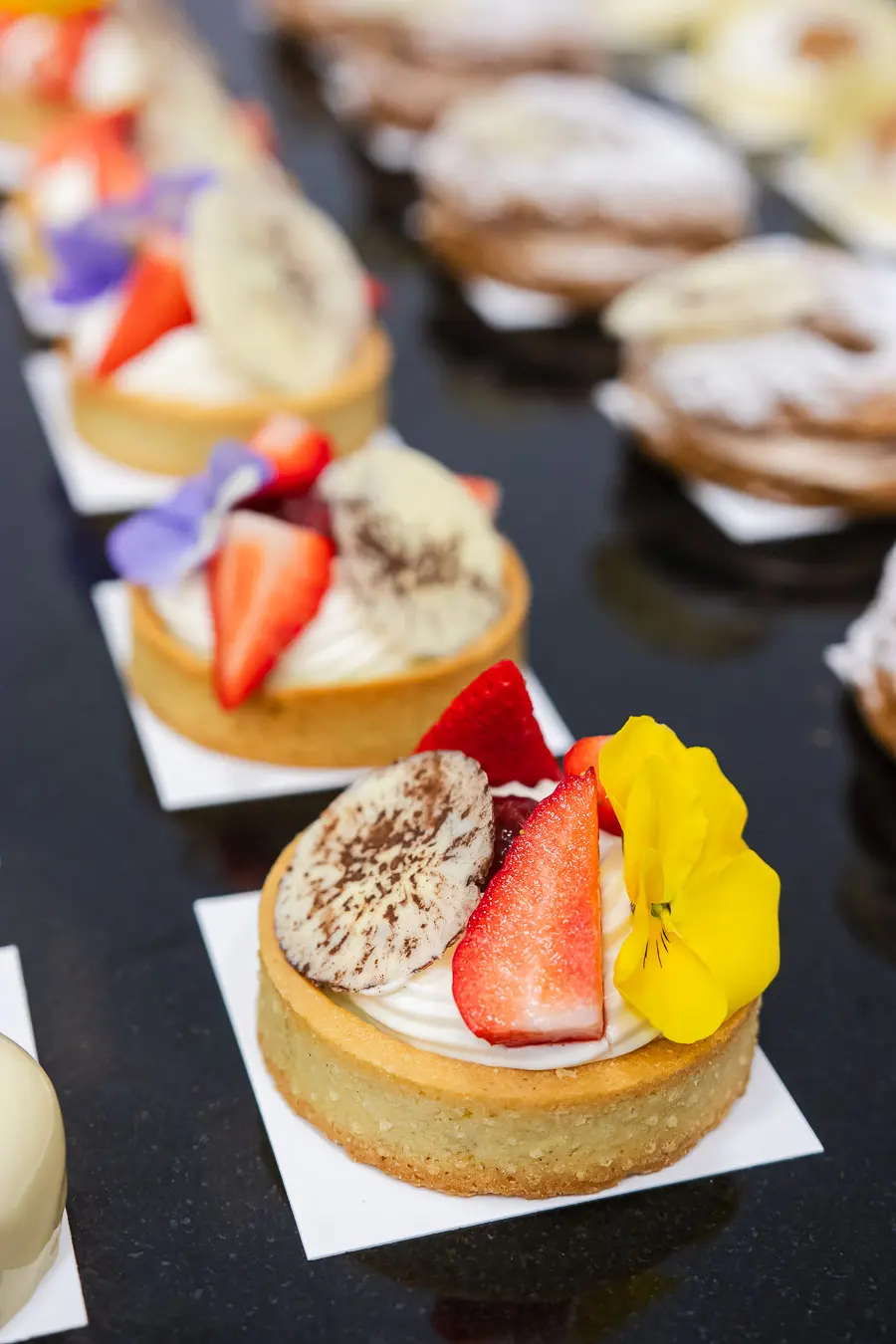
The image shows fruit tartlets with cream, strawberry, banana and an edible flower. It is used as the example discussed in the operating manual for completing ALT, title, caption and description fields for images in WordPress and WooCommerce.
Recommended fields for this image
| Field | Recommended value |
|---|---|
| ALT | Fruit tartlets with cream from the Desery na słodki stół course |
| Title | Fruit tartlets with cream – Desery na słodki stół |
| Caption | Fruit tartlets as an example of desserts for a sweet table. |
| Description | The image shows fruit tartlets with cream, strawberry, banana and an edible flower. It is used as the example discussed in the operating manual for completing ALT, title, caption and description fields for images in WordPress and WooCommerce. |